
Napper: Baby Sleep & Parenting
NapperParenting
4.6105.00 Reviews
- Version
- 6.68.0
- Installs
- 1.00M
- Age Rating
- Everyone
Screenshots
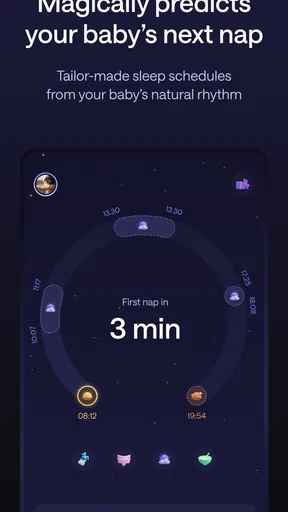
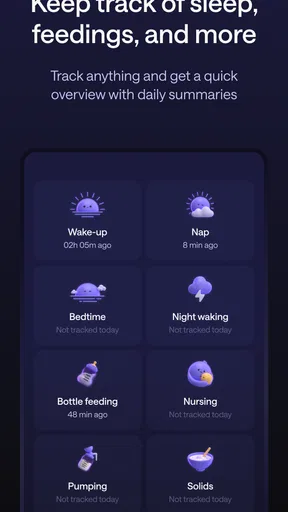
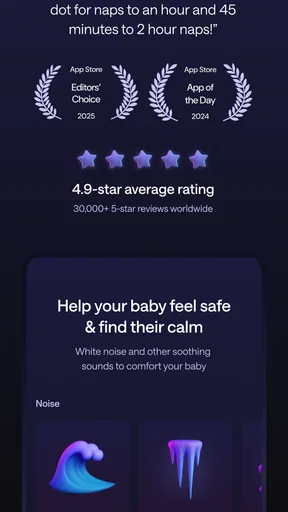
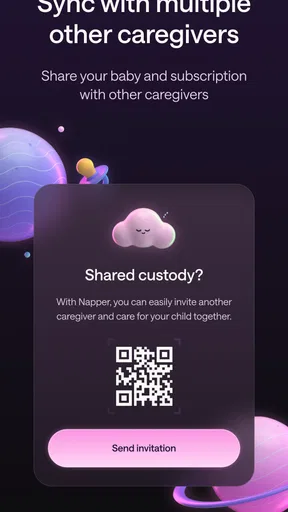
Our Review of Napper: Baby Sleep & Parenting
 Analysis by Appyee
When a baby’s sleep feels unpredictable, even small decisions can become exhausting: Is it time to try a nap, should I keep the room quiet, and is last night’s pattern worth changing today? I see Napper: Baby Sleep & Parenting as a practical place to organize those questions rather than a promise that an app can make every night easy. It brings sleep tracking, sounds, and nap planning together, which can be useful when tired parents need a clearer picture of the day.
What you can expect before paying
Napper is a free parenting app from Napper, with optional in-app purchases priced from $9.99 to $69.99 per item. That makes the basic decision straightforward: you can consider the app without an upfront purchase, while some items cost extra. I would not assume that every tool or piece of advice is included for free; check the in-app purchase details before buying anything and decide whether the specific paid item fits what you need.
The app is rated for Everyone, and it has a 4.6 average from around 12,000 ratings. It has been installed over 500,000 times, so it is not an obscure experiment, though popularity alone can’t tell me whether its approach will suit a particular baby or household. It first appeared in 2021, and version 6.38.0 is the current release. The minimum operating system is 7.0.
Getting Started with Napper
Setting up Napper was a breeze. The app walks you through an easy onboarding process, asking a few questions about your baby’s sleep habits and age. This helps tailor the content and advice you receive, which is a nice touch. The interface is clean and intuitive, making it straightforward to navigate even when you’re sleep-deprived.
Features Galore
Napper doesn’t just throw a bunch of sleep sounds at you and call it a day. Oh no, it offers a suite of features aimed at understanding and improving your baby’s sleep patterns. Here’s a quick rundown:
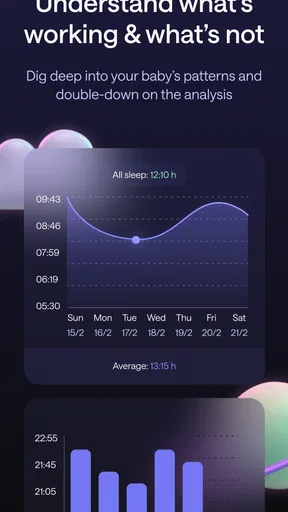
- Sleep Tracker: Keep tabs on your baby’s sleep schedule with ease. The app allows you to log naps and nighttime sleep, helping you spot trends and make adjustments as needed.
- Sleep Sounds: From white noise to lullabies, Napper offers a variety of soothing sounds. You can mix and match to your heart’s content until you find your baby’s sweet spot.
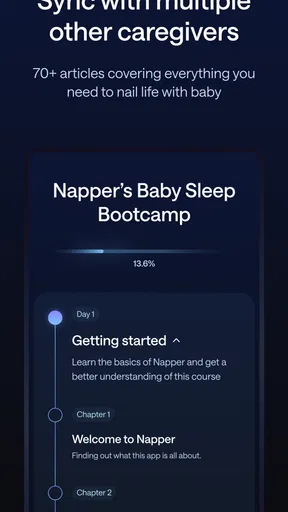
- Parenting Tips: The app goes beyond sleep, offering parenting advice and tips that are genuinely helpful. It’s like having a pocket-sized parenting coach.
- Expert Insights: Napper collaborates with sleep experts to provide evidence-based advice, which is reassuring when you’re navigating the tricky world of infant sleep.
Turning logs into a useful routine
The tracker is most helpful when I treat it as a record, not a verdict. A single short nap can happen for many reasons, and it does not automatically mean the whole schedule needs to change. Logging sleep over several days gives a more useful view: perhaps naps tend to shift after a busy morning, or bedtime becomes harder when the final stretch of the day runs long. That kind of pattern is more actionable than reacting to one rough afternoon.
There is a trade-off, though. Every entry takes attention at exactly the time a parent may have the least spare attention. I’d keep logging simple and consistent rather than trying to capture every detail. If recording a nap means interrupting settling or putting down a baby who needs comfort, the log is not worth that disruption. The app should support caregiving, not turn it into a data-entry task.
A useful workflow is to check the record at a calm moment, such as after the baby is asleep, and note only what will help with the next decision. Then look for a repeated tendency rather than chasing a perfect timetable. This keeps the tracker from becoming another source of pressure and makes it easier to notice whether a small routine adjustment seems to help.
Putting Napper to the Test
So, how does all of this translate into real-world use? After a week with Napper, I noticed a significant improvement in how we approached sleep. The sleep tracker was particularly enlightening. I hadn’t realized just how erratic our nap times were until I saw them laid out in the app. With this insight, I was able to establish a more consistent routine, and it made a world of difference.
The sleep sounds were another hit. I was a bit skeptical about their effectiveness, but they worked wonders in creating a calming environment. My little one’s favorite was the gentle rain sound, and it quickly became part of our bedtime ritual.
Making the sounds work for your household
Sounds are best thought of as a familiar cue, not a guaranteed sleep switch. In a real evening routine, I’d choose one sound the baby responds to, use it consistently at the same transition, and give it time before deciding whether it helps. Switching among options every few minutes can make it harder to tell what the baby actually prefers. If a sound seems irritating or distracting, there is no reason to keep using it just because it is available.
There is also a practical household question: who starts the sound, and when? If one caregiver usually handles bedtime, the routine may be easy to maintain; if care is shared, agreeing on a simple sequence can make the sound feel consistent rather than random. The app can help provide the cue, but it cannot make everyone follow the same routine. A low-effort habit is more likely to last than a complicated setup.
Parents should also keep ordinary safe-sleep guidance and their child’s needs ahead of any sound routine. A soothing track does not replace a safe sleep space, attentive care, or professional advice when something seems wrong. I’d use the audio as one small part of settling, not as a substitute for judgment or a way to mask a concern.
A realistic day with the app
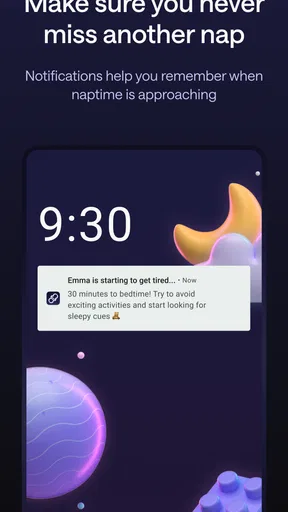
Imagine a morning when the first nap happens later than expected. Instead of deciding that the day is ruined, I’d record the sleep, continue with the usual routine, and use the app’s schedule guidance as a reference for when to offer the next rest. If the baby is clearly tired sooner, I would respond to the baby rather than wait for a screen to approve the timing. At the end of the day, the entries can help me see whether this was an isolated change or part of a recurring pattern.
That example captures the balance I’d aim for: Napper can make the day easier to interpret, but it should not become the authority over a baby’s cues. The parent still has the context the app cannot see, such as an unusual outing, illness, visitors, or a disrupted night. A useful plan is flexible enough to accommodate those realities without making every variation feel like a failure.
Beyond Sleep
What I appreciated most about Napper was its holistic approach to parenting. The app isn’t just about getting your baby to sleep; it’s about supporting you as a parent. The parenting tips were practical and relatable, covering everything from managing teething to finding time for self-care.
One of the standout features was the expert insights. It’s comforting to know that the advice you’re getting is backed by science, especially when you’re bombarded with conflicting information from well-meaning family and friends.
How it compares with simpler alternatives
The usual alternative is not always another app. Some parents keep nap times in a notes app, write them on paper, or rely on memory and a familiar routine. Those approaches can be quicker and have fewer distractions. If all you need is a basic record, a notebook may be enough, especially if you prefer not to consult a phone during the day.
Napper’s appeal is that it connects tracking with sleep sounds, nap guidance, and parenting content in one place. That combination can save the effort of switching between a timer, a sound player, and separate advice sources. The trade-off is that a broader app can feel like more than you need if you only want to note when a nap began. I’d choose the simplest option that solves the actual problem, rather than treating more tools as automatically better.
Compared with generic baby trackers, the sleep-centered approach is a better fit when naps and bedtime are the main concerns. If your priority is keeping a broad record of feeding, diaper changes, or other care routines, a general-purpose tracker may be a more natural match. Napper’s stated focus is sleep and parenting support, so I would not choose it solely on the assumption that it replaces every kind of baby log.
Where the guidance needs a human check
Personalized suggestions can feel reassuring, but a baby’s sleep is affected by more than age and a schedule. A family trip, a difficult night, discomfort, or a change in the day can alter what seems workable. I would use the app’s guidance as a starting point, then adjust for what is happening in front of me. If a suggested nap time repeatedly clashes with the baby’s cues, the cue matters more than preserving a neat schedule.
Sleep advice also has limits. An app can help organize routines and offer general information, but it is not a clinician and cannot assess a child’s health. If a sleep change comes with concerning symptoms, or a parent is worried about the baby’s wellbeing, I would contact an appropriate health professional instead of trying to solve it through tracking or tips. That distinction is important: convenience is valuable, but it is not medical care.
Another limitation is that consistency depends on the adults using it. If one caregiver records every sleep and another does not, the history may be incomplete. I’d agree on a minimal shared approach—record the start and end of sleep when practical, and avoid arguing over small discrepancies. The goal is to support a calmer routine, not to create a perfect record or another task to police.
Who is likely to get the most value
I think the app is a strong candidate for a first-time parent who wants help noticing sleep patterns, a caregiver who finds nap timing difficult to judge, or a household that likes pairing a simple sound cue with a repeatable routine. It may also suit parents who are tired of searching separate sources for basic sleep-related guidance and want a more organized starting point. Those benefits are most likely to matter when the app’s tools fit naturally into the day.
It may be less suitable for parents who already have a routine that works and do not want to log anything, or for anyone who finds schedule prompts stressful. A baby who sleeps unpredictably can make a rigid plan feel discouraging, and no app can guarantee a particular outcome. If you prefer paper notes, want only a timer, or would rather avoid optional purchases altogether, a simpler alternative may feel better.
Families should also consider whether both caregivers will actually use it. A tracker is only useful as a shared reference if the people caring for the baby can keep up with it in a low-pressure way. If the app becomes one parent’s extra responsibility, its convenience may not outweigh the work. In that situation, a short shared note or a verbal handoff may be more realistic.
Deciding whether the paid options are worthwhile
The free entry point makes it reasonable to explore whether the core approach suits your family before spending money. I would first use the parts that are available without payment and identify a specific gap: perhaps you need a particular kind of guidance or want to understand what an optional item adds. Only then would I compare that need with the listed purchase price. Paying because you hope it will solve every sleep challenge is a poor test of value.
Because optional items range from $9.99 to $69.99, the possible spend is not trivial at the upper end. I would check which item is being offered, what it gives you, and whether you are likely to use it repeatedly. A one-time curiosity is different from something that directly supports a routine you already use. The right value judgment depends on the specific item and your household, not on the app being free to download.
It is also sensible to pause before buying during a particularly hard night. Exhaustion can make any promise of better sleep feel urgent. I’d wait until a calmer moment, decide what problem I’m trying to address, and then see whether the purchase appears to address that problem. If the answer is vague, sticking with the free access or choosing a simpler method is the safer decision.
Final Thoughts
In a world where sleep feels like a luxury, Napper: Baby Sleep & Parenting is a breath of fresh air. It’s more than just a sleep aid; it’s a comprehensive tool for navigating the early days of parenthood. Whether you’re struggling with sleep or just looking for some extra support, Napper is worth a download.
So, if you’re ready to reclaim your nights and make peace with nap time, give Napper a try. It might just become your new best friend on this wild parenting journey.
My recommendation comes with one qualification: approach it as a helper, not a promise. The strongest reason to try it is the way sleep logging, sounds, and guidance can turn a vague sense of “today was all over the place” into a routine you can think about calmly. Its biggest drawback is the possibility of adding more tracking and expectations to an already demanding day. If it reduces guesswork, keep it; if it makes you feel tied to the screen or worried about every off-schedule nap, step back.
For me, the best buy-or-skip verdict is to try the free access first, use the tracker only as much as is genuinely helpful, and judge any optional purchase on its own merits. Parents seeking a sleep-focused companion may find that combination worthwhile. Those who want a complete medical answer, a guaranteed sleep fix, or a broad all-purpose care record should look elsewhere or seek the appropriate professional support. Used flexibly, Napper can be a useful part of a parent’s toolkit without pretending to replace parental judgment.
Verdict
Strengths of Napper: Baby Sleep & Parenting
- User-friendly interface for easy navigation.
- Customizable sleep schedules and routines.
- Includes a variety of soothing sounds.
- Offers insightful parenting tips.
- Tracks sleep patterns and progress.
Limitations of Napper: Baby Sleep & Parenting
- Limited features in the free version.
- Requires internet for full functionality.
- Occasional app crashes reported by users.
- Subscription may be costly for some.
- Limited language support.
Similar Picks in This Category
View All
Family Space
Motorola Mobility LLC.3.9

شرطة الأطفال - مكالمة وهمية
Oub Apps4.1

Findmykids: Parental Control
LETEM LTD4.6

Pregnancy + | Tracker App
Philips Electronics UK Limited4.8

Policía de niños - para padres
Kids police4.7

Pregnancy App
Amila4.9
Frequently Asked Questions
What features does Napper offer for helping with baby sleep?
Napper provides a comprehensive suite of tools to aid in baby sleep management, including customizable sleep schedules, soothing sounds, and sleep tracking. It also offers expert tips and insights on baby sleep patterns, allowing parents to make informed decisions. The app aims to create a peaceful environment for both baby and parents.
Is Napper suitable for first-time parents?
Absolutely, Napper is designed with first-time parents in mind. It offers user-friendly guidance and educational resources to help new parents understand their baby’s sleep needs. The app's intuitive interface makes it easy to navigate, and its expert advice can be invaluable for those unfamiliar with infant sleep patterns.
How does Napper ensure the safety and privacy of user data?
Napper prioritizes user privacy by implementing robust data encryption and secure storage measures. The app complies with all relevant data protection regulations, ensuring that personal and baby-related information is kept confidential. Users can also manage their privacy settings to control what data is shared.
Can Napper be used for multiple children?
Yes, Napper supports profiles for multiple children, making it convenient for parents with more than one child. Each profile can be customized with individual sleep schedules and preferences, allowing parents to manage their children’s sleep patterns efficiently within a single application.
Does Napper require a subscription or is it a one-time purchase?
Napper offers both a free version with basic features and a premium subscription that unlocks additional functionalities. The subscription model provides access to advanced tools and personalized insights, enhancing the overall user experience. Users can choose the option that best suits their needs and budget.
